
Tired of that random default IGN Krafton stuck you with on day one? Learning how to change name in BGMI takes about 60 seconds once you have a Rename Card in your inventory but there are a few rules, costs, and character limits that trip players up. We’ll walk you through every step, from grabbing the card to picking a name that actually gets approved.
What You Need to Change Your Name in BGMI
To rename your account in Battlegrounds Mobile India, you need one item: a Rename Card. It’s a single-use consumable stored in your inventory, and without it, the in-game name field stays locked.
You can get a Rename Card in a few ways:
- Buy it from the in-game Shop using UC (Unknown Cash)
- Redeem it as an event reward during limited-time login or mission events
- Claim it from Royale Pass milestones when Krafton includes one in the RP track
- Pick it up from Crate openings on rare occasions
New accounts also receive one free Rename Card after reaching a certain level, so if you’ve never renamed before, check your inventory first.
How to Change Name in BGMI: Step-by-Step
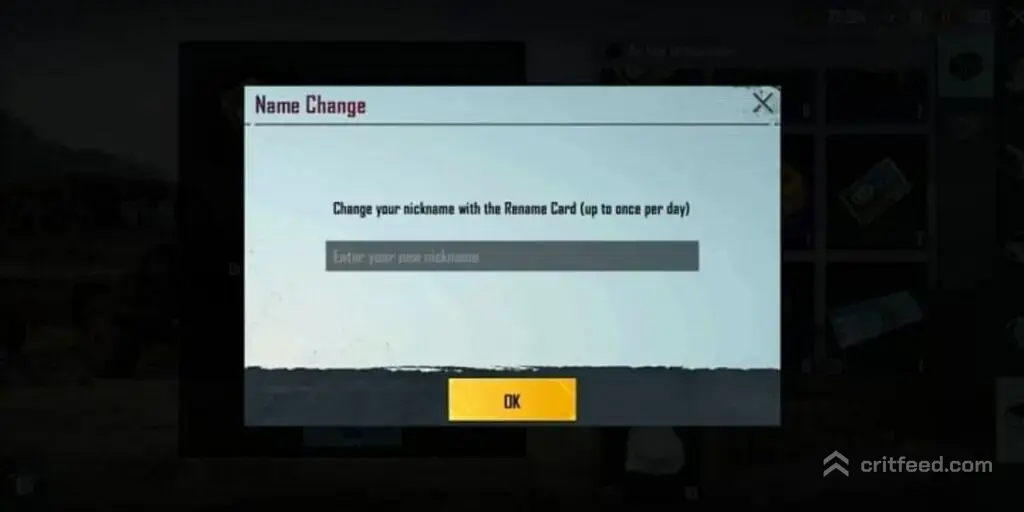
Once you have a Rename Card ready, the actual rename process is quick. Here’s exactly what to tap:
- Launch BGMI and log into your account.
- Tap your profile avatar in the top-left corner of the lobby.
- In the profile window, tap the pencil / edit icon next to your current username.
- If you own a Rename Card, a prompt will appear asking to use it.
- Type your new name into the text field.
- Tap OK / Confirm to apply.
Your new IGN updates instantly across the lobby, leaderboards, and friend lists. If you don’t have a Rename Card, the same prompt will redirect you to the Shop.
BGMI Rename Card Cost and Where to Buy It
The Rename Card sits in the Shop under the Popularity / Items section. Prices can shift with sales and regional adjustments, so always check the in-game price before buying.
| Item | Purpose | Where to Find |
|---|---|---|
| Rename Card | Change username once | Shop → Items |
| Free Rename Card | One-time new player reward | Inventory (after unlock) |
| Event Rename Card | Free from missions/events | Event tab |
If you’re low on currency, our guide on free UC in PUBG Mobile covers the legit ways to stock up before your next Shop run.
BGMI Username Rules You Must Follow
A lot of rename attempts fail not because of bugs, but because the chosen name breaks Krafton’s rules. Keep these in mind:
- Character limit: Usernames must be between a set minimum and maximum length (typically short — around 3 to 14 characters).
- No offensive language: Slurs, hate speech, or explicit words will be blocked.
- No impersonation: Names imitating Krafton staff, moderators, or well-known pros can be flagged.
- Special symbols: Standard symbols work, but some Unicode characters may be rejected.
- Unique usernames not required: Two players can share the same display name — your account is identified by a unique Character ID, not the name.
If the game says “name already taken” or “invalid,” tweak a character or symbol and try again — the Rename Card is not consumed until the name is successfully accepted.
Stylish Name Ideas and Symbols
Want that clean esports-style IGN? Most players pair a short word with a symbol or clan tag. Common patterns you’ll see in ranked lobbies:
- ꧁ᴺᴬᴹᴱ꧂ — decorative brackets around small caps
- †Name† — cross/dagger symbols
- ϟNameϟ — lightning bolts
- iиsαиe — mixed Cyrillic and Latin lookalikes
You can generate these using free “fancy text” or “stylish name” tools, then paste the result into the rename field. Just double-check the character count before confirming.
Can You Change Your BGMI Name for Free?
Yes — but only under specific conditions:
- First-time free card given to new accounts after unlocking the inventory
- Event rewards during festivals, anniversaries, or new season launches
- Royale Pass rewards on select tracks
Outside those, every rename costs a Rename Card purchased with UC. There is no unlimited free rename feature in BGMI.
Common Rename Problems and Fixes
If the rename isn’t working, one of these is usually the reason:
- “Rename Card not found” — you don’t own one; head to the Shop.
- “Illegal characters” — remove symbols or emojis and try again.
- “Name already exists” — rare, but try adding a symbol.
- Game not updating name — restart the app; the change is server-side.
- Card expired — event-reward cards sometimes have expiry dates listed in your inventory.
For account-related issues that a rename doesn’t fix, our breakdown of what BGMI actually is and its account system may help.
BGMI vs PUBG Mobile: Same Process?
BGMI is the Indian version of PUBG Mobile, and the rename system works identically across both clients. If you play the global build, our companion guide on how to change name in PUBG Mobile covers the same flow with the global Shop layout.
Other quick account tasks players usually do alongside a rename:
- Clean up your friends list — see how to unfriend in BGMI
- Check your competitive standing in the PUBG Mobile ranks system
- Move to a bigger screen with PUBG Mobile on PC
The Bottom Line
Changing your name in BGMI comes down to one item the Rename Card and one 30-second edit in your profile. Buy the card with UC, redeem an event reward, or use your one free card as a new player, then pick a name that fits Krafton’s rules on length and language.
Ready to match your new IGN with a killer loadout? Check out our guide on the M416 Glacier skin to complete the flex.