

If you have ever watched a top mobile player spray a full M416 mag without their crosshair drifting, you have seen the gyroscope at work. Gyroscope in PUBG Mobile is a motion-sensing feature that lets you aim by physically tilting your phone or tablet, using the device’s built-in gyro sensor instead of only your thumb on the screen. In this guide, we break down what is gyroscope in PUBG, how it works, and the sensitivity values you should actually try.
What Is Gyroscope in PUBG Mobile?
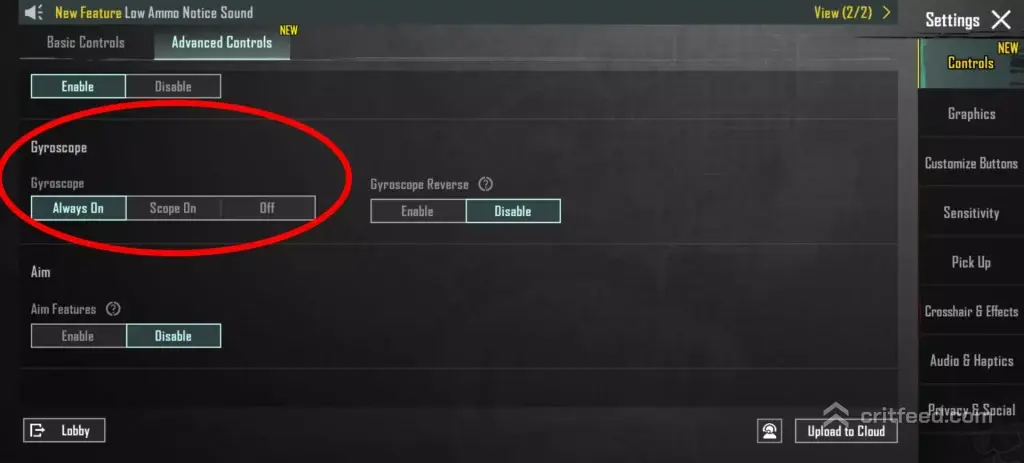
The gyroscope is a hardware sensor inside your phone that tracks rotation on three axes — pitch, yaw, and roll. PUBG Mobile reads that data and converts it into in-game aim movement.
In simple terms: when you tilt your phone, your crosshair moves. Tilt down and your gun tips down. Tilt right and your view pans right. It works alongside your right thumb, not instead of it.
You will find the toggle inside Settings → Basic → Gyroscope, with three options:
- Always On — gyro is active at all times, including hipfire
- Scope On — gyro only activates when you ADS or open a scope
- Off — pure thumb aim
How the Gyroscope Actually Works
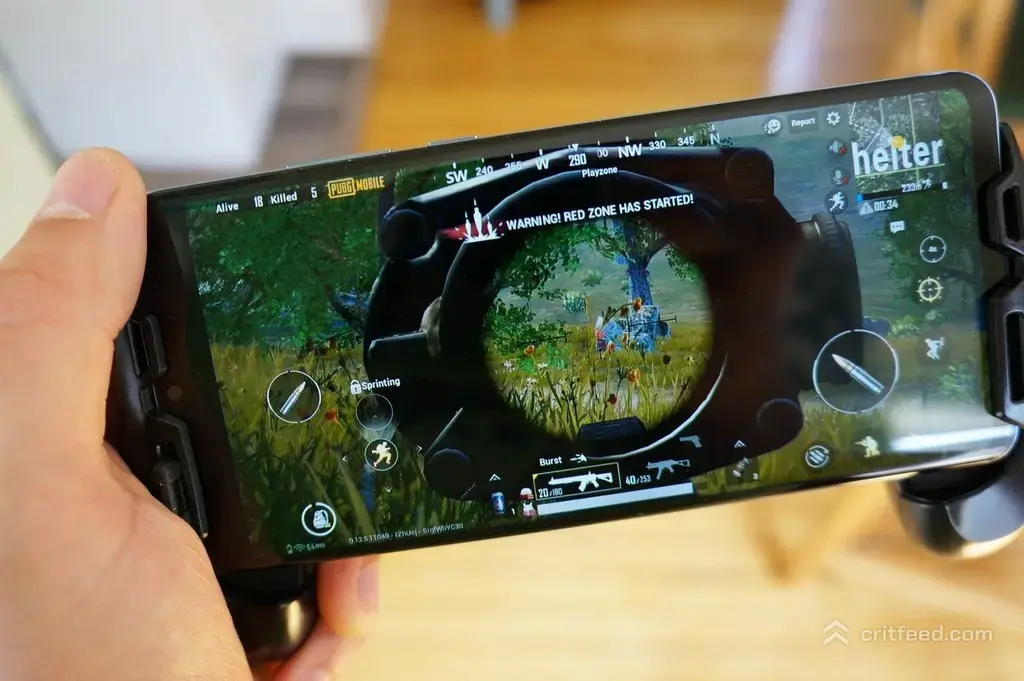
The sensor inside your device measures angular velocity — basically, how fast your phone is rotating. The game maps that rotation onto your camera and weapon.
Two things matter here:
- The gyro adds to your thumb input. You can still swipe with your right thumb; the gyro just gives you a second, faster input for micro-adjustments.
- It only responds to rotation, not shaking. Moving your phone in a straight line does nothing. It has to twist.
This is why gyro is so strong for recoil control. When a gun kicks up, you tilt the phone slightly down to push the muzzle back onto target — faster than any thumb swipe.
Why Serious Players Use Gyroscope
If you plan to push tiers or chase a Conqueror climb, gyro is close to mandatory at the top of pubg mobile ranks. Here is why:
- Faster tracking. Your neck and wrists move quicker than a thumb across glass.
- Free right thumb. Your thumb can stay on fire, jump, or lean buttons while you aim with the gyro.
- Better spray control. Micro-tilts counter vertical and horizontal recoil in real time.
- Cleaner flick shots. A wrist twist beats a thumb drag for 180° turns.
The trade-off is a real learning curve. Expect 1–2 weeks of feeling worse before you feel better.
Gyroscope Modes Compared
| Mode | Best For | Downside |
|---|---|---|
| Always On | 4-finger and claw players who want gyro on hipfire too | Harder to keep steady while running |
| Scope On | 2-finger and 3-finger players learning gyro | No help with hip-fire close range |
| Off | Casual thumb players | Slower recoil control at higher ranks |
Our pick for beginners: start with Scope On for the first week, then move to Always On once your hands stop over-correcting.
Recommended Gyroscope Sensitivity Settings
There is no single “best” gyro sensitivity — it depends on your phone size, grip, and finger layout. But these values give most players a solid starting point. Adjust in the Training Ground until it feels right.
| Scope | Gyroscope Sensitivity |
|---|---|
| TPP (No Scope) | 300% |
| FPP (No Scope) | 300% |
| Red Dot / Holo / Aim Sight | 300% |
| 2x Scope | 300% |
| 3x Scope / Win94 | 250% |
| 4x Scope / VSS | 200% |
| 6x Scope | 100% |
| 8x Scope | 80% |
Rule of thumb: the higher the zoom, the lower the gyro. Long-range scopes amplify every tiny wobble, so you want less movement per tilt.
How to Test Your Sensitivity
- Head into Training Ground.
- Pick up an M416 with a 4x scope.
- Spray 30 rounds at a static target from 50 meters using only gyro.
- If the muzzle climbs off target, raise gyro sensitivity. If you overshoot, lower it.
- Repeat with a 6x on a 100-meter target.
Small changes matter here. Adjust in 10–20% steps, never 100%.
Finger Layout and Gyroscope
Your control scheme decides how much gyro can help you. Two-finger players get the biggest jump — the gyro basically becomes their third and fourth “fingers.”
- 2-finger: Gyro replaces most of your right-thumb aim work. Huge upgrade.
- 3-finger: Free your right thumb for fire and jump; gyro handles aim.
- 4-finger claw: Use gyro for recoil only; thumbs still handle broad aim.
- 5-finger / 6-finger: Fully custom HUD, gyro for fine tracking only.
If you are still finding your grip, our pubg mobile beginner guide walks through claw setups from scratch.
Common Gyroscope Mistakes to Fix
Most players who “hate gyro” are making one of these errors:
- Sensitivity too high. If your screen jerks when you breathe, cut gyro by 30%.
- Playing on a flat table. Gyro needs you to hold the device in the air. Lying flat kills the sensor angle.
- Turning it off in fights. You have to commit for weeks or the muscle memory never sticks.
- Ignoring ADS sensitivity. Gyro and ADS sensitivity work together. Rebalance both.
- Old or budget devices. Very low-end phones can have inaccurate gyro sensors — expect drift.
Does Every Phone Support Gyroscope?
Most modern Android and iOS devices ship with a gyro sensor, but not all. Budget phones under a certain price tier sometimes skip it and use only an accelerometer, which does not work for PUBG Mobile gyro aim.
To check: open Settings → Basic → Gyroscope in PUBG Mobile. If the option is greyed out or missing, your device does not have one. In that case, an best emulator for pubg mobile or a controller setup through pubg mobile controller support may be your alternative for precision aim.
Gyroscope Tips From Ranked Play
A few habits that separate gyro users who climb from ones who plateau:
- Hold the phone with a slight upward tilt at rest. That way, tilting down for recoil feels neutral, not strained.
- Grip near the middle of the device, not the corners. You get more control over rotation.
- Use a cooling pad or fan. Thermal throttling drops gyro polling rate on some phones during long matches.
- Practice with the bolt action rifle in pubg category. Kar98 and AWM headshots are the fastest way to build gyro flick memory.
- Warm up daily in TDM before ranked. Ten minutes is enough.
For more ranked-focused habits, our pubg mobile tips and tricks collection is worth a read.
Gyroscope for Sprays vs Snipes
Gyro is not one skill — it is two.
- Spray gyro (ARs, SMGs): small, constant downward tilt to counter recoil while your thumb holds fire. Higher sensitivity works better.
- Snipe gyro (DMRs, bolt actions): tiny, deliberate wrist rotations for headshots. Lower sensitivity works better.
That is why the sensitivity table above drops so hard at 6x and 8x. A gyro value that feels perfect for M416 sprays will make an AWM shot impossible.
The Bottom Line
Gyroscope in PUBG Mobile is motion aiming: your phone’s rotation sensor turns physical tilts into in-game aim, sitting on top of your normal thumb controls. Turn it on, start at the sensitivities above, and give yourself two weeks in Training Ground and TDM before judging it. Once it clicks, your recoil control and reaction time jump in a way no thumb-only player can match.
Ready to put it to work? Pair your new gyro setup with the best guns in pubg mobile and start climbing.