
Want to play like one of Brazil’s most exciting young talents? These mzinho CS2 settings break down everything from his mouse sensitivity to crosshair code, helping you replicate his aggressive rifling style.
mzinho has quickly established himself as a key player for FURIA, known for his crisp aim and explosive entry fragging. Let’s dive into the exact settings he uses to dominate servers.
mzinho Mouse Settings

mzinho runs a relatively moderate sensitivity setup that balances precision with the ability to make quick flick shots—essential for his aggressive playstyle.
| Setting | Value |
|---|---|
| DPI | 800 |
| In-Game Sensitivity | 0.9 |
| eDPI | 720 |
| Zoom Sensitivity | 1.0 |
| Hz (Polling Rate) | 1000 |
| Windows Sensitivity | 6 |
| Raw Input | On |
His 720 eDPI sits in the medium-low range, giving him enough control for precise AK-47 sprays while still allowing quick crosshair repositioning. If you’re looking to optimize your aim further, check out our guide on cs2 mouse sensitivity.
mzinho Crosshair Settings
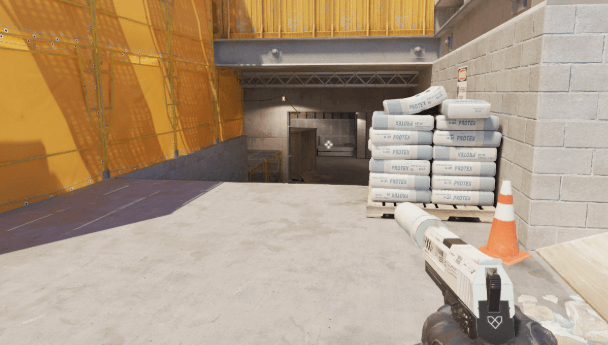
mzinho uses a clean, static crosshair that provides excellent visibility without cluttering his screen during firefights.
Crosshair Code:
CSGO-Ow6Dd-jdPYC-uSvPM-YaCAQ-nXeuFCrosshair Breakdown
| Setting | Value |
|---|---|
| Style | 4 (Static) |
| Size | 2 |
| Gap | -2 |
| Thickness | 1 |
| Outline | Yes (0.5) |
| Color | Green (1) |
| Dot | No |
The tight gap and small size create a precise aiming point, perfect for holding angles and landing headshots. The outline ensures visibility against any background.
mzinho Video Settings

Performance is king for professional players. mzinho prioritizes maximum FPS over visual fidelity, which you should consider when optimizing your cs2 video settings.
| Setting | Value |
|---|---|
| Resolution | 1280×960 |
| Aspect Ratio | 4:3 |
| Scaling Mode | Stretched |
| Display Mode | Fullscreen |
Advanced Video Settings
| Setting | Value |
|---|---|
| Boost Player Contrast | Enabled |
| V-Sync | Disabled |
| Multisampling Anti-Aliasing | 4x MSAA |
| Global Shadow Quality | Medium |
| Model/Texture Detail | Low |
| Texture Filtering Mode | Bilinear |
| Shader Detail | Low |
| Particle Detail | Low |
| Ambient Occlusion | Disabled |
| High Dynamic Range | Performance |
| FidelityFX Super Resolution | Disabled |
The 4:3 stretched resolution makes player models appear wider, potentially easier to hit. Many Brazilian pros favor this setup. For NVIDIA users wanting extra frames, our cs2 nvidia settings guide covers additional optimizations.
mzinho Viewmodel Settings
A clean viewmodel keeps your screen uncluttered during crucial moments.
viewmodel_fov 68viewmodel_offset_x 2.5
viewmodel_offset_y 0
viewmodel_offset_z -1.5
viewmodel_presetpos 3
cl_righthand 1
mzinho Radar Settings
Proper radar configuration is crucial for gathering information without looking away from the action. For a complete breakdown of radar customization, see our cs2 radar settings guide.
| Setting | Value |
|---|---|
| Radar Centers The Player | Yes |
| Radar Rotation | Yes |
| Radar Hud Size | 1.0 |
| Radar Map Zoom | 0.5 |
mzinho Keybinds
mzinho uses a fairly standard bind setup with some personal tweaks for utility management.
| Action | Key |
|---|---|
| Jump | Space / Mouse Wheel Down |
| Crouch | Left Ctrl |
| Walk | Left Shift |
| Use | E |
| Inspect Weapon | F |
| Drop Weapon | G |
| Smoke | 4 |
| Flashbang | Mouse4 |
| HE Grenade | Mouse5 |
| Molotov | C |
Having grenades bound to mouse buttons allows for quick utility usage without taking fingers off movement keys—critical for fast-paced entry fragging.
mzinho PC Specs
Professional performance requires professional hardware:
| Component | Specification |
|---|---|
| Monitor | 360Hz |
| Mouse | Logitech G Pro X Superlight |
| Mousepad | Large (450mm+) |
| Keyboard | Mechanical |
| Headset | HyperX |
How to Apply mzinho’s Settings
- Copy the crosshair code and paste it in Settings > Crosshair > Share or Import
- Adjust your sensitivity based on your mousepad size—720 eDPI requires decent space
- Match video settings for optimal FPS, then tweak based on your hardware
- Practice the setup in deathmatch before competitive play
Should You Copy Pro Settings?
mzinho’s settings work for his playstyle and preferences. Use them as a starting point, not a final destination. Your optimal sensitivity depends on factors like:
- Mousepad size
- Arm vs. wrist aiming style
- Personal comfort
- Hardware differences
Compare these settings with other pros like s1mple or donk to find what resonates with your playstyle.
Conclusion
These mzinho CS2 settings give you a solid foundation to experiment with. His moderate eDPI, stretched resolution, and performance-focused video settings reflect the current pro meta. Start with his crosshair and sensitivity, then adjust based on your comfort level.